How to Install an LP16 RJ45 Wire-to-Wire Waterproof Connector Step by Step
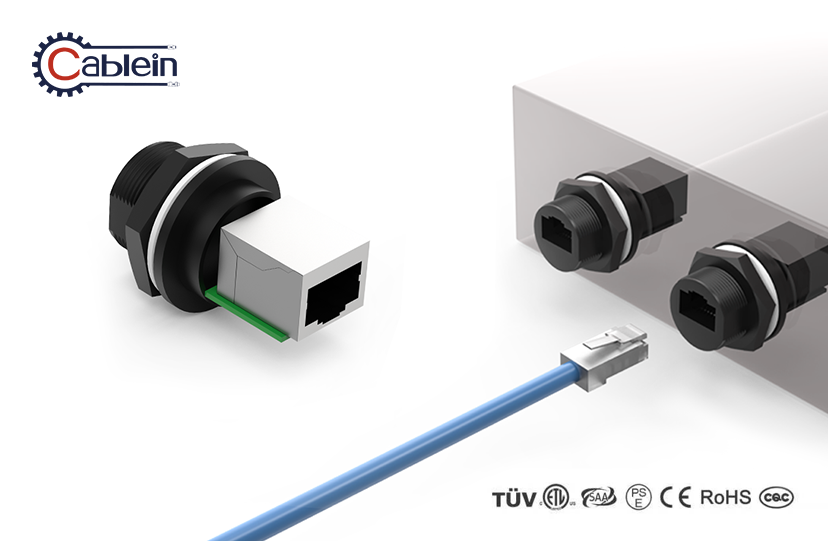
Installing an LP16 RJ45 wire-to-wire waterproof connector correctly is essential for maintaining reliable Ethernet connectivity in outdoor and industrial environments. This connector features a female-to-female feed-through design with IP67/IP68 ratings, snap-lock coupling, and a UL94-V0 flame-retardant housing rated from -40℃ to +105℃. Whether you are extending Cat5e or Cat6 cables across an LED installation, a solar energy system, or a surveillance network, following the correct procedure ensures the waterproof seal holds and signal integrity is preserved throughout the connector's service life.
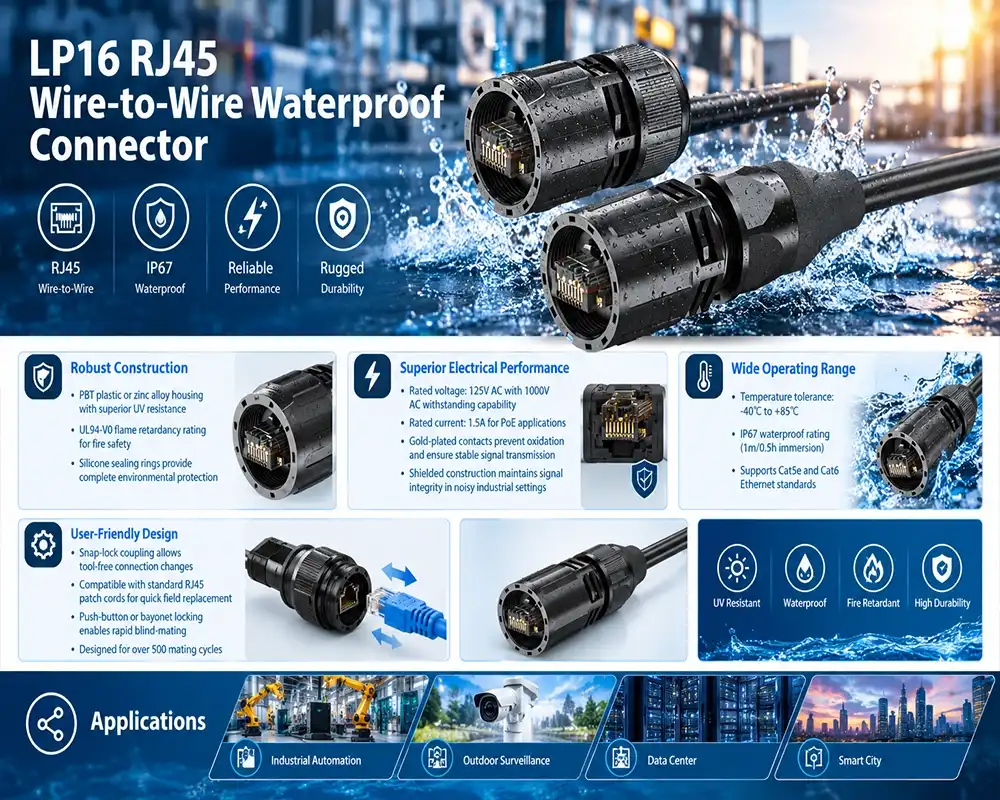
Introduction to the LP16 RJ45 Wire-to-Wire Waterproof Connector
RJ45 plugs were never meant to be used outside. Signal loss and system downtime are caused by moisture getting in, UV damage, and mechanical vibration. These are problems that engineers in the LED lighting, industrial automation, and security sectors often have to deal with.
The LP16 from Cablein fixes these problems with a sealed, inline cable-extension design. Inside the 16mm bayonet-style housing is a gold-plated RJ45 interface with contacts plated up to 50μ. The interface is surrounded by silicone sealing rings that have an insulation resistance above 500MΩ and a contact resistance below 30mΩ. The body is made of PBT plastic or zinc alloy, which makes it more resistant to UV light. It has also been certified by TUV and CE to meet ISO9001 and RoHS standards, which means it is ready for international project approvals.
The wire-to-wire feed-through design is better than panel-mount options because it lets you extend an inline cable without any signal degradation. This is very important when routing Ethernet across LED arrays, smart factory floors, or renewable energy sites.
Preparing for Installation — Tools, Materials, and Safety Considerations
Most waterproof seals that don't work in the field fail because the planning process was rushed. It only takes ten minutes to check your tools and supplies before putting them together, which saves hours of work later.
Required Tools and Materials
Get these things ready before you start:
- RJ45 crimping tool that can be used with Cat5e and Cat6 plugs
- Wire stripper with a precise depth gage
- Isopropyl alcohol wipes for cleaning eyes
- Torque screwdriver (if fixing next to a panel is needed)
- Replacement silicone O-ring (keep one extra for each link)
Pre-Installation Safety Checklist
Before you touch any wire, make sure of the following:
- Turn off any PoE switches or injectors that are connected to the wire run.
- Look for cracks, bent threads, or damaged O-rings in the LP16 case.
- Check the type of cable: Cat5e or Cat6; Cat6a can be used in protected setups.
- Make sure the temperature of the working area is between -40°C and +85°C.
- Make sure that the outer diameter of the wire fits the cable entry seal on the connection.
IEC 60529 says that to get an IP67 or IP68 rating for an LP16 RJ45 wire-to-wire waterproof connector, you need a properly rated housing, the right amount of assembly force, and a gasket that isn't broken. Not following the plan can damage a connection that is designed to be mated over 500 times.
Step-by-Step Installation Process
The installation goes through five reasonable steps once your desk is ready. Each phase has a direct effect on both the electrical performance and the waterproofing over time.
Phase 1 — Cable Preparation and Wire Stripping
Before terminating the plug, slide the rear cable gland nut and waterproof boot onto the cable. This is the step that people forget to do the most when they are installing in the field. Using a calibrated wire stripper, take off 25 to 30 mm of the outer jacket. Untwist the pairs as little as possible, making sure that the length that isn't twisted is less than 13 mm (TIA-568 requirements) to stop crosstalk. Make sure all eight conductors can be seen and are not damaged before trimming the ends of the wires flush.
Phase 2 — Pinout Wiring and RJ45 Termination
As per the T568B wiring standard, which is used in most commercial settings in North America, arrange the wires in this way: white-orange, orange, white-green, blue, white-blue, green, white-brown, brown. Put the wires all the way into the RJ45 plug, making sure that each lead touches the front wall of the plug. Press down hard and evenly on the crimp. Most irregular connection problems in outdoor video systems are caused by plugs that aren't properly crimped.
Phase 3 — Assembly and Snap-Lock Engagement
Connect the RJ45 plug that has been ended to the female-to-female feed-through body. Line up the slots on the bayonet and turn it until you hear the snap-lock connection engage. The clicking sound lets you know that the closing ring is fully in place. Do not force the connection; threads that are out of place will damage the rubber closing ring and lower the IP rating.
Phase 4 — Sealing and Waterproof Verification
Tighten the cable gland nut on the back entry of the LP16 RJ45 wire-to-wire waterproof connector by hand, then use a wrench to give it one more quarter-turn to squeeze the internal seal. Do not over-torque, as this will damage the seal instead of making it better. For deployments with an IP68 rating, check the O-ring seating visually before committing. For important infrastructure installations like offshore power systems or traffic monitoring nodes, an IEC 60529 vacuum leak test is suggested.
Troubleshooting and Maintenance Tips
Even connectors that were installed correctly need to be checked every so often, especially in places where the temperature changes often, salt spray is used, or high-pressure washing is done.
Common Installation Errors and Fixes
Most of the time, intermittent data loss after installation is caused by one of three things: an RJ45 plug that wasn't fully crimped, a silicone O-ring that moved while the gland was being tightened, or conductors that were put in the wrong pinout order. Before you close any box, use a wire tester on both ends of the unit. If the signal reduction is higher than what is allowed by Cat6 (as tested by Fluke testing for return loss and crosstalk), you should not try to fix it but instead should re-terminate the plug.
Corrosion on the gold-plated contacts means that either the seal is broken or the connection is a fake one that doesn't have real gold plating. Use isopropyl alcohol to clean any contacts that can be reached, and look over the closing ring. If the corrosion has reached the contact surface, you should get a new connector.
In harsh outdoor settings, regular maintenance should include an eye check every six months. Pay special attention to the gland nut torque and O-ring state after thermal shock or physical impact.
Comparison and Procurement Advice
There are differences in how well different waterproof RJ45 plugs work. It's important to know the difference between IP67 and IP68. IP67 covers immersion up to 1 meter for 30 minutes, while IP68 covers ongoing immersion beyond 1 meter. IP68 is the standard for underground cable ducts and submerged farm sensor networks.
Wire-to-wire connectors like the LP16 work better than panel-mount options for inline extension tasks because they don't need an enclosure. This means that less material is needed and installation time is shorter for network runs that are spread out. The snap-lock, tool-free coupling system saves time in the field compared to traditional waterproof housings that need separate casings and sealing tape, which is important for buying teams that are looking at the total cost of ownership.
To find a provider for an LP16 RJ45 wire-to-wire waterproof connector, look for ones that can prove that they have TUV and CE certifications, give you IEC 60529 waterproof test reports, and offer OEM/ODM services for custom cable lengths and harnesses that are already put together. Cablein keeps more than 10,000 units of each SKU in stock and ships standard orders within 7–10 days. Customized configurations can be scheduled at any time, which is a supply reliability factor that directly protects project timelines in infrastructure deployments that happen quickly.
Conclusion
If you put an LP16 RJ45 wire-to-wire waterproof connector correctly, your network will still work even if other hardware breaks. If you do each step in the right order, the installation process is easy: prepare the wire properly, terminate to T568B, fully engage the snap-lock mechanism, and check the gland seal before deployment. This method, along with regular maintenance checks, makes connectors last longer and stops the unplanned downtime that costs network operators in industrial and outdoor settings a lot more than the connector itself.
FAQ
Does this connector support PoE applications?
Yes. The LP16 can handle 1.5A of PoE and works with IEEE 802.3af/at/bt standards, so it can send both power and data at the same time without getting too hot.
Can it be installed without special tools?
The snap-lock coupling can be connected and disconnected without any tools. To terminate an RJ45 plug, you need a standard crimping tool, which is something that every network worker has in their toolbox.
How do I verify the waterproof seal after installation?
Check the seating of the O-rings and the compression of the gland nuts visually. A vacuum leak test according to IEC 60529 is the most effective way to make sure that something works before it is used in important situations.
Is it suitable for both indoor and outdoor environments?
Yes. It can work in temperatures ranging from -40°F to +85°F, and its UL94-V0 housing means it can be used in both climate-controlled factories and outdoor installations that are open to the elements.
What certifications does it carry?
The LP16 is certified by TUV and CE, and it meets the quality management system requirements of ISO9001:2015 and the environmental standards of RoHS/REACH.
Request a Quote from Cablein — Trusted LP16 RJ45 Wire-to-Wire Waterproof Connector Manufacturer
Customers in over 100 countries have been able to get certified waterproof connectivity solutions from Cablein Technology since 2017. You can buy our LP16 RJ45 wire-to-wire waterproof connector right now. It has been tried and is ready for your next project. You can email our engineering team at nick@cableinco.com or go to connectorswaterproof.com to get a datasheet, set up a custom harness, or talk about price for large orders. It comes with reliable delivery, OEM support, and technical support 24 hours a day, 7 days a week.
References
1. Cablein Technology Co., Limited. (2024). LP16 RJ45 Wire-to-Wire Waterproof Connector — Product Datasheet. connectorswaterproof.com.
2. International Electrotechnical Commission. (2013). IEC 60529: Degrees of Protection Provided by Enclosures (IP Code). IEC.
3. Telecommunications Industry Association. (2012). TIA-568-C.2: Balanced Twisted-Pair Telecommunications Cabling and Components Standard. TIA.
4. Fluke Networks. (2022). Understanding Cable Test Results: Crosstalk, Attenuation, and Return Loss. Fluke Networks knowledge Base.
5. IEEE Standards Association. (2018). IEEE 802.3bt: Power over Ethernet Standard. IEEE.
6. UL (Underwriters Laboratories). (2023). UL 94: Standard for Tests for Flammability of Plastic Materials for Parts in Devices and Appliances. UL Standards.